
More languages
More actions
No edit summary |
No edit summary |
||
| Line 177: | Line 177: | ||
== Interface Function Description == | == Interface Function Description == | ||
{| class="wikitable prettytable" | {| class="wikitable prettytable" | ||
! align="center" |'''<big> | ! align="center" |'''<big>Interface Name</big>''' | ||
! align="center" |'''<big> | ! align="center" |'''<big>Function Description</big>''' | ||
|- | |- | ||
| align="center" |'''ESP32-S3''' | | align="center" |'''ESP32-S3''' | ||
| | |Display module main control,control board peripheral and external peripheral. | ||
|- | |- | ||
| align="center" |''' | | align="center" |'''MicroSD card slot''' | ||
| | |A MicroSD card is inserted to expand the storage space for storing | ||
large data such as characters, pictures, and audio files. | |||
|- | |- | ||
| align="center" |''' | | align="center" |'''Serial port''' | ||
|1.25mm | |1.25mm 4P connector.It can be used for serial debugging, downloading, | ||
and communication. An external USB to serial port module is required. | |||
|- | |- | ||
| align="center" |''' | | align="center" |'''BOOT Key''' | ||
| | |Used to enter download mode or key test. | ||
Press and hold this button to power on and release it to enter the download mode. | |||
Alternatively, press and hold this button and then press the RESET button to release the | |||
RESET button and then release this button to enter the download mode. | |||
When you do not need to enter the download mode, this button can be used as a common button. | |||
|- | |- | ||
| align="center" |''' | | align="center" |'''Type-C Interface''' | ||
| | |Used for module power supply and download programs. | ||
This interface is connected to the one-click download circuit on the module, | |||
which can automatically enter the download mode (without pressing the BOOT key). | |||
|- | |- | ||
| align="center" |''' | | align="center" |'''RESET Key''' | ||
| | |Used for ESP32 master control and LCD reset, level reset after pressing. | ||
|- | |- | ||
| align="center" |''' | | align="center" |'''Expand Pin''' | ||
|1.25mm 4P座子。引出GPIO17/18引脚 | |1.25mm 4P座子。引出GPIO17/18引脚 | ||
|- | |- | ||
Revision as of 11:54, 28 February 2026
Product Picture
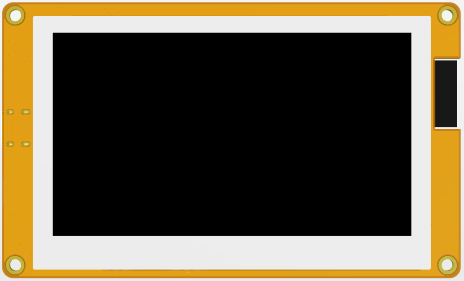
ES3R43P-TopView
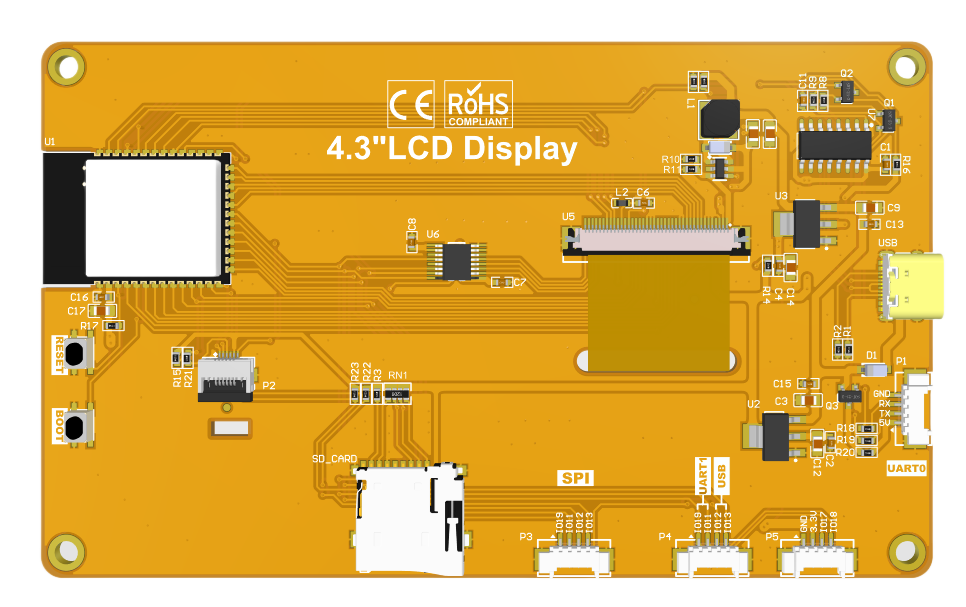
ES3R43P-BottomView


Product Description
- Integrated with ESP32-S3, boasting powerful performance, easy development and abundant development resources.
- 4.3-inch color screen with a resolution of 480x272 and rich display colors (RGB565).
- Rich interfaces for easy connection of various peripherals (IIC, UART, etc.).
- Built-in resistive touch screen for convenient human-computer interaction.
- Standard TYPE-C interface for easy program downloading and power supply.
- Built-in micro TF card slot for convenient storage expansion.
- Abundant sample programs are provided for easy learning.
- Underlying driver technical support is available, with WIKI materials updated online.
- The module has passed multiple aging tests and inspections, meeting military-grade standards and supporting long-term stable operation.
Product Parameters
ESP32 Parameters
| Name | Parameter |
|---|---|
| Module | ESP32-S3 |
| CPU | Xtensa LX7 32-bit dual-core processor |
| Clock rate | 240MHz(MAX) |
| Memory | 384KB ROM+512KB SRAM+16KB RTC SRAM+8M internal OPI PSRAM +16M external SPI Flash
(N16R8) |
| WIFI | 2.4GHz, 802.11b/g/n mode |
| Bluetooth | Bluetooth V5.0 BR/EDR and Bluetooth LE standard |
| Operation voltage | 3.0~3.6(V) |
Screen parameters
| Item | parameters |
|---|---|
| Screen Size | 4.3inch |
| Screen Type | TN |
| Screen resolution | 480xRGBx272(pixels) |
| Active Area | 95.04(W)x53.86(H)(mm) |
| Number of pixels | 65K(RGB565) |
| Drive IC | ST7282 |
| Screen interface | RGB565-16Bit |
| pixels size | 0.153(H)x0.153(mm) |
| View Angle | 6 ’CLOCK |
| Luminance(TYP) | 340 cd/m2 |
| Backlight Type | White LED*7 |
| Operation Temperature | -20~60(℃) |
| Storage Temperature | -30~70(℃) |
Other parameters
| Item | parameters | |
|---|---|---|
| SKU | ES3R43P | ES3N43P |
| Effective area size | 4.3 inch | |
| Operation Temperature | 5.0V | |
| Power interface | USB(Type-C) | |
| Total current(TPY) | 168mA | mA |
| Backlight brightness(actual value) | 340cd/m2 | cd/m2 |
| Total Power | 0.83W | |
| Touch screen type | Resistive touch screen | Not |
| Resolution | 480x272(pixels) | 480x272(pixels) |
| Driver IC | XPT2046 | 无 |
| Communication Interface | SPI | 无 |
| Material | ITO film +ITO glass | |
| LCD Outline Size | 50.00±0.2(W)x69.20±0.2(H)x2.3±0.1(D)(Excluding cables and adhesive backing) | |
| Touch Screen Outline Size | 50.00±0.2(W)x69.20±0.2(H)x1.20 (D) ±0.1(D)(Excluding cables and adhesive backing) | |
| Module Outline Size | 50.00(W)x86.00(H)x10.60(D) | |
| Operation Temperature | -20~60(℃) | -20~60(℃) |
| Storage Temperature | -30~70(℃) | -30~70(℃) |
| Weight(including package) | 电阻款(ES3R43P): g | 无触摸款(ES3N43P): g |
Interface Definition

Interface Function Description
| Interface Name | Function Description |
|---|---|
| ESP32-S3 | Display module main control,control board peripheral and external peripheral. |
| MicroSD card slot | A MicroSD card is inserted to expand the storage space for storing
large data such as characters, pictures, and audio files. |
| Serial port | 1.25mm 4P connector.It can be used for serial debugging, downloading,
and communication. An external USB to serial port module is required. |
| BOOT Key | Used to enter download mode or key test.
Press and hold this button to power on and release it to enter the download mode. Alternatively, press and hold this button and then press the RESET button to release the RESET button and then release this button to enter the download mode. When you do not need to enter the download mode, this button can be used as a common button. |
| Type-C Interface | Used for module power supply and download programs.
This interface is connected to the one-click download circuit on the module, which can automatically enter the download mode (without pressing the BOOT key). |
| RESET Key | Used for ESP32 master control and LCD reset, level reset after pressing. |
| Expand Pin | 1.25mm 4P座子。引出GPIO17/18引脚 |
| UART1与USB接口 | 1.25mm 4P座子。引出GPIO17、GPIO18、GPIO19、GPIO20四个空闲引脚,GPIO17、GPIO18可用于UART1,GPIO19、GPIO20可用于USB协议。 |
| SPI外设接口 | 1.25mm 4P座子。用于外接SPI通信设备,此SPI接口跟电阻触摸屏和SD卡共用。可做普通IO使用。 |
ESP32引脚分配
| 板载设备 | ESP32连接引脚 | 板载设备引脚说明 |
|---|---|---|
| 液晶屏 | IO40 | 液晶屏片选控制信号,低电平有效 |
| IO46 | 数据使能控制引脚 | |
| IO41 | 垂直同步信号控制引脚 | |
| IO39 | 水平同步信号控制引脚 | |
| IO42 | 像素时钟控制引脚 | |
| IO42/48/47/21/14 | 5位RED数据引脚 | |
| IO5/6/7/15/16/4 | 6位GREEN数据引脚 | |
| IO8/3/46/9/1 | 5位BLUE数据引脚 | |
| 电阻触摸屏 | IO12 | 电阻屏SPI总线时钟控制引脚 |
| IO13 | 电阻屏SPI总线数据写入控制引脚 | |
| IO11 | 电阻屏SPI总线数据读取控制引脚 | |
| IO38 | 电阻屏SPI总线片选控制引脚 | |
| IO18 | 电阻屏SPI总线中断控制引脚 | |
| MicroSD 卡 | IO10 | SD卡SPI总线片选控制引脚 |
| IO11 | SD卡SPI总线数据读取控制引脚 | |
| IO13 | SD卡SPI总线数据写入控制引脚 | |
| IO12 | SD卡SPI总线时钟控制引脚 | |
| 按键 | IO0 | 下载模式选择按键(按住该按键上电,然后松开就会进入下载模式) |
| EN | ESP32-S3复位按键,低电平复位(和液晶屏复位共用) | |
| 串口 | RXD0(IO43) | ESP32-S3串口接收信号(如果不使用串口,可做普通IO使用) |
| TXD0(IO44) | ESP32-S3串口发送信号(如果不使用串口,可做普通IO使用) | |
| SPI接口 | IO19 | SPI总线片选控制引脚 |
| IO11 | SPI总线数据读取控制引脚 | |
| IO13 | SPI总线数据写入控制引脚 | |
| IO12 | SPI总线时钟控制引脚 | |
| 扩展接口 | IO18 | 当不使用触摸和SD卡功能时,可当普通IO口使用 |
| IO17 | 当不使用触摸和SD卡功能时,可当普通IO口使用 | |
| USB | IO19 | USB总线差分信号数据线负极 |
| IO20 | USB总线差分信号数据线正极 | |
| UART1 | IO17 | ESP32-S3串口1发送信号引脚 |
| IO18 | ESP32-S3串口1接收信号引脚 |
快速使用说明
资料包下载
高速云盘分享链接1: 2.8inch ESP32-S3-isplay module data package
百度云盘备份链接2: 2.8寸ESP32-S3-ILI9341驱动显示模块资料包(提取码:yvne)
高速云盘备份链接3: 2.8inch ESP32-S3-isplay module data package
产品文档
规格书
产品规格书
液晶屏规格书
用户手册
尺寸图
3D图
原理图
IO资源分配表

参考资料
开发环境搭建
示例代码说明
 2.8寸ESP32-S3显示模块MicroPython示例程序说明

