Toggle menu
Toggle personal menu
Not logged in
Your IP address will be publicly visible if you make any edits.

4.0inch ESP32-32E Display: Difference between revisions

From LCD wiki
More languages
Created page with "zh:4.0inch_ESP32-32E_Display {{#widget:StyledHeader | color = #bc1d46 }} = Product Images = {{gallery|width=350px|height=350px |File:E32R40T-03.png|E32R40T-TopView |File:E32R40T-04.png|E32R40T-BottomView }} {{gallery|width=350px|height=350px |File:E32N40T-01.png|E32N35T-TopView |File:E32N40T-02.png|E32N40T--BottomView }} = Product Introduction = * It comes with an ESP32-32E module, which is convenient for development and has sufficient development resources. * 3.95..."
 
No edit summary
Line 5: Line 5:
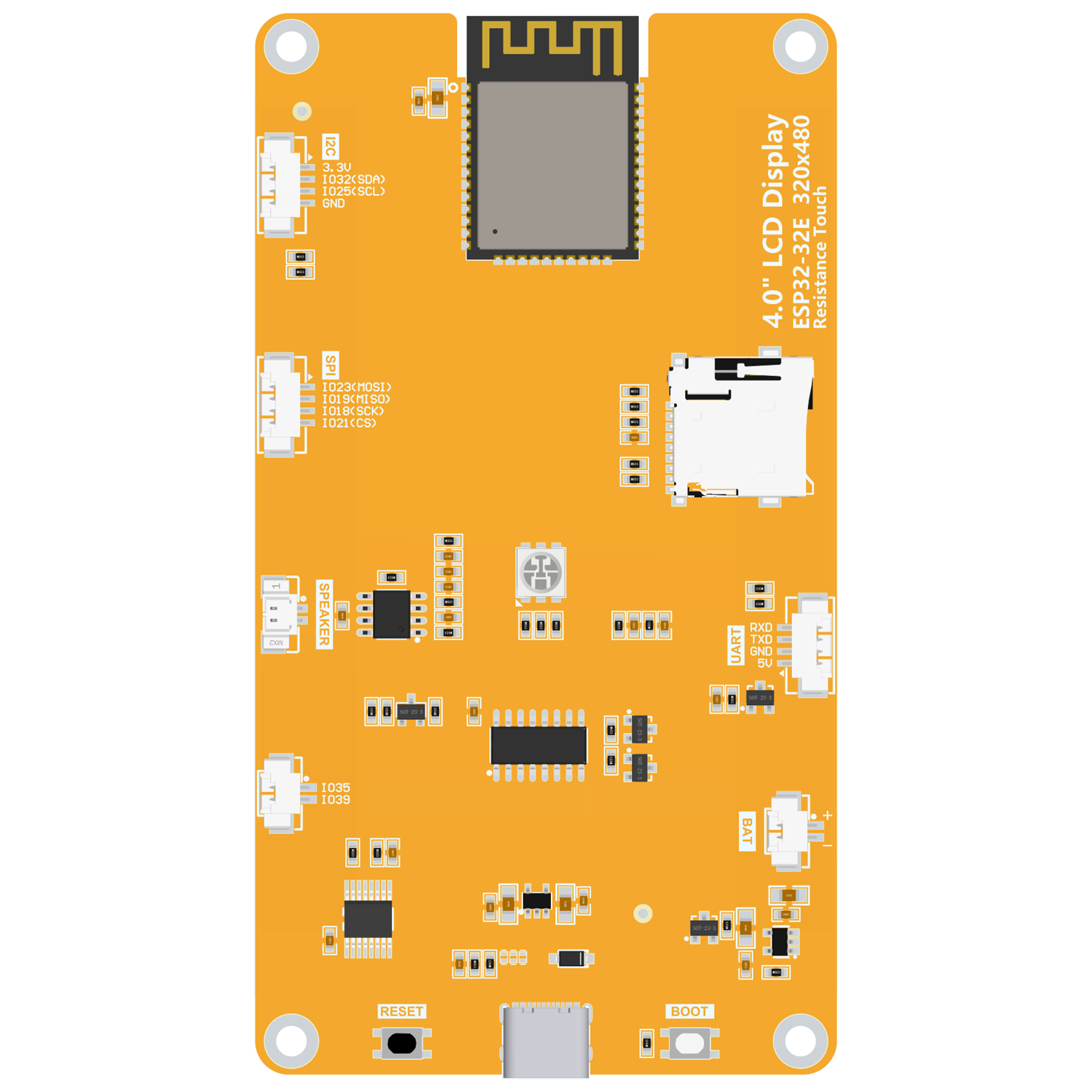
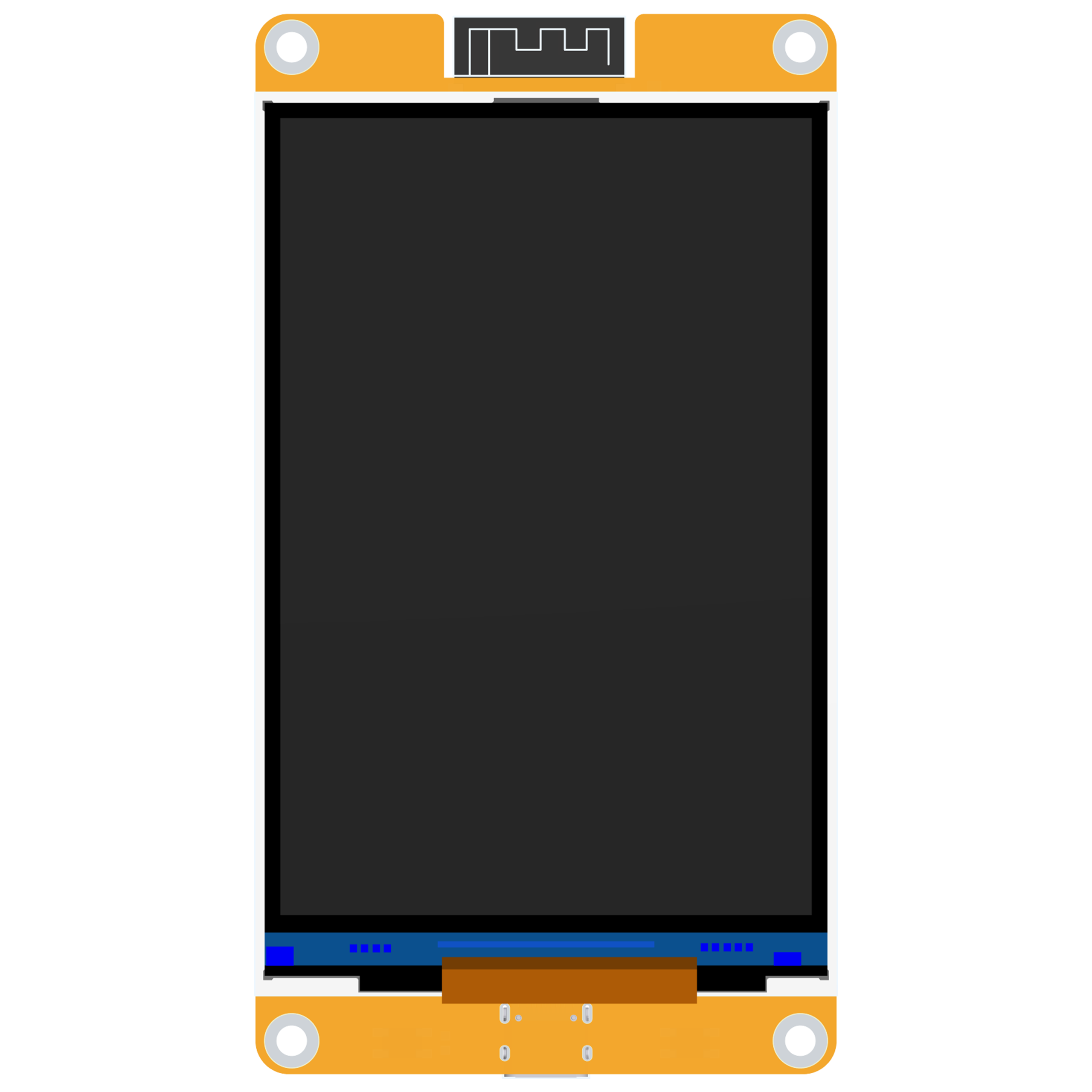
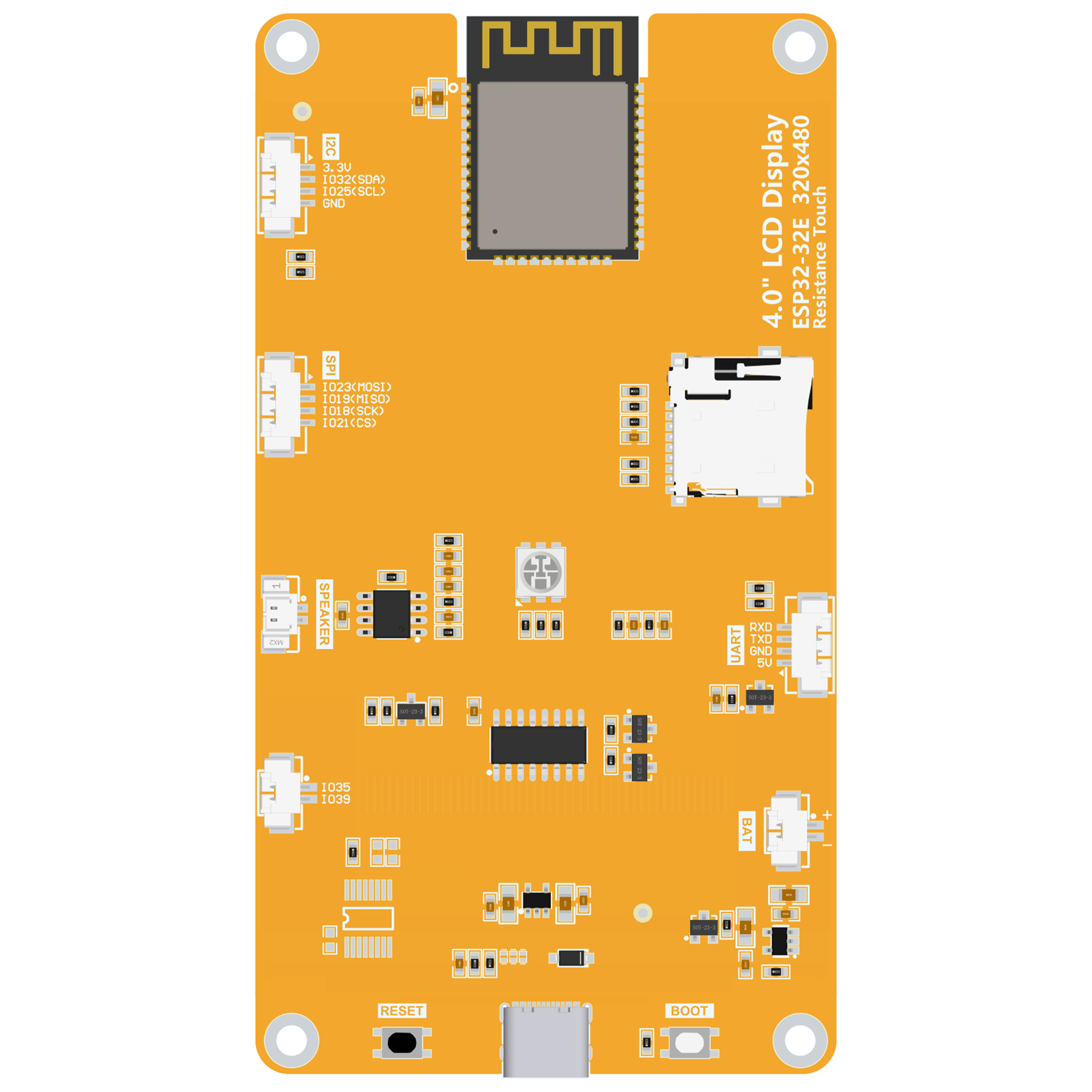
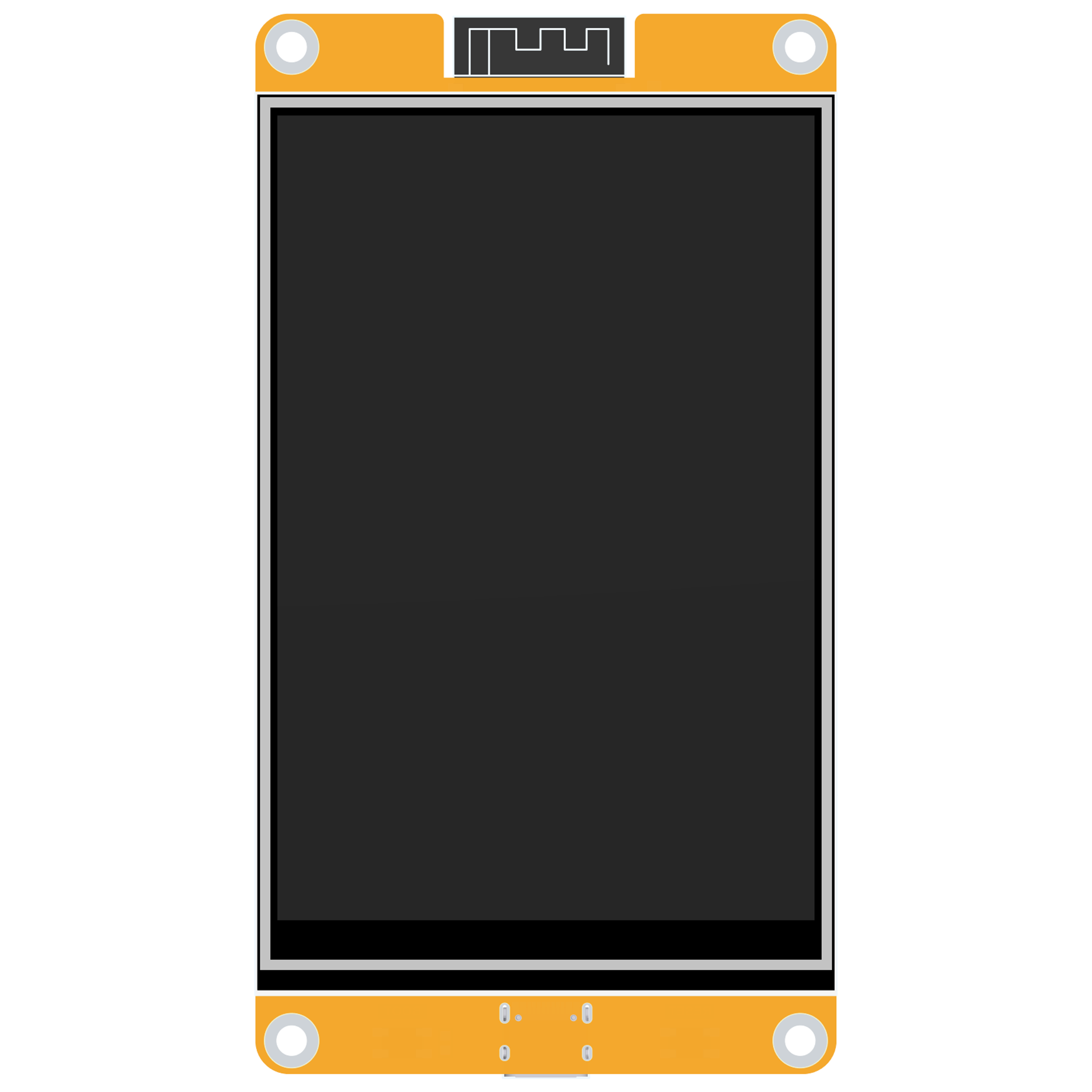
= Product Images =
= Product Images =
{{gallery|width=350px|height=350px
|File:E32R40T-03.png|E32R40T-TopView
|File:E32R40T-03.png|E32R40T-TOPView
|File:E32R40T-04.png|E32R40T-BottomView
|File:E32R40T-04.png|E32R40T-BottomView
}}
}}
Line 15: Line 15:


= Product Introduction =
* It comes with an ESP32-32E module, which is convenient for development and has sufficient development resources.
* Built-in ESP32-32E module with abundant development resources
* 3.95/4.0-inch color screen with a resolution of 320x480, supporting a maximum of 262K colors (RGB666), and displaying rich colors.
* 3.95/4.0 inch color display, 320x480 resolution, supporting 262K colors (RGB666)
* Rich interfaces, making it convenient to connect various peripherals (such as I2C, SPI, UART and other peripherals).
* Rich interfaces (I2C, SPI, UART, etc.) for peripheral connectivity
* Supports external speakers for audio playback.
* Supports external speakers for audio playback
* Comes with an RGB tricolor indicator light, providing rich status indications.
* Built-in RGB tri-color indicator lights
* Comes with a resistive touch screen, facilitating human-computer interaction.
* Integrated resistive touch screen
* Standard TYPE-C interface, making it convenient for program downloading and power supply.
* Standard TYPE-C interface for programming and power
* Comes with a micro TF card slot, making it convenient to expand storage.
* Micro TF card slot for storage expansion
* Supports external lithium batteries, which is lightweight and portable.
* Supports external lithium battery with charging management
* Comes with a battery charging management circuit to ensure the safe charging and discharging of the battery.
* Includes comprehensive example programs and technical documentation
* Provides rich example programs, making it convenient for learning.
* Military-grade reliability with multi-stage aging tests
* Provides underlying driver technical support, and WIKI materials are updated online.
* The module has undergone multiple aging tests and can reach military-grade standards, supporting long-term stable operation.


= Product Parameters =


== ESP32 Main Control Parameters ==
== ESP32 Main Controller Parameters ==
{| class="wikitable prettytable"  
! align="center" |'''<big>Name</big>'''
! Name !! Parameter
! align="center" |'''<big>Parameters</big>'''
|-
|-
| align="center" |'''Module'''
| Module !! ESP32-32E
| align="center" |ESP32-32E
|-
|-
| align="center" |'''CPU'''
| CPU !! ESP32-D0WD-V3, Xtensa dual-core 32-bit LX6 microprocessor
| align="center" |ESP32-D0WD-V3, Xtensa dual-core 32-bit LX6 microprocessor
|-
|-
| align="center" |'''Main Frequency'''
| Clock Speed !! 240MHz (max)
| align="center" |240MHz (maximum)
|-
|-
| align="center" |'''Storage'''
| Memory !! 448KB ROM + 520KB SRAM + 16KB RTC SRAM + 4MB QSPI Flash
| align="center" |448KB ROM + 520KB SRAM + 16KB RTC SRAM + 4MB external QSPI Flash
|-
|-
| align="center" |'''WIFI'''
| WiFi !! 2.4GHz, 802.11b/g/n
| align="center" |2.4GHz, 802.11b/g/n mode
|-
|-
| align="center" |'''Bluetooth'''
| Bluetooth !! Bluetooth V4.2 BR/EDR and BLE
| align="center" |Bluetooth V4.2 BR/EDR and Bluetooth LE standards
|-
|-
| align="center" |'''Operating Voltage'''
| Operating Voltage !! 3.0~3.6V
| align="center" |3.0~3.6(V)
|-
|-
| align="center" |'''Operating Temperature'''
| Temperature Range !! –40~85°C
| align="center" |–40~85(℃)
|}
|}


== Liquid Crystal Screen Parameters ==
== LCD Parameters ==
{| class="wikitable prettytable"  
! align="center" |'''<big>Name</big>'''
! Name !! Parameter
! align="center" |'''<big>Parameters</big>'''
|-
|-
| align="center" |'''Screen Size'''
| Screen Size !! 3.95/4.0 inch
| align="center" |3.95/4.0 inch
|-
|-
| align="center" |'''Screen Type'''
| Screen Type !! TN TFT
| align="center" |TN TFT
|-
|-
| align="center" |'''Resolution'''
| Resolution !! 320xRGBx480 pixels
| align="center" |320xRGBx480(pixels)
|-
|-
| align="center" |'''Effective Display Area'''
| Active Area !! 55.68(W)x83.52(H) mm
| align="center" |55.68(W)x83.52(H)(mm)
|-
|-
| align="center" |'''Number of Colors'''
| Color Depth !! 262K (RGB666), 65K (RGB565)
| align="center" |Maximum: 262K(RGB666)
Commonly used: 65K(RGB565)
|-
|-
| align="center" |'''Driver IC'''
| Driver IC !! ST7796S
| align="center" |ST7796S
|-
|-
| align="center" |'''Display Interface'''
| Interface !! 4-line SPI
| align="center" |4-Line SPI(connected to ESP32)
|-
|-
| align="center" |'''Pixel Size'''
| Pixel Size !! 0.174mm x 0.174mm
| align="center" |0.174(H)x0.174(mm)
|-
|-
| align="center" |'''Viewing Angle'''
| Viewing Angle !! 12 o'clock
| align="center" |12 0’CLOCK
|-
|-
| align="center" |'''Backlight Brightness (Typical Value)'''
| Backlight !! 450 cd/m² (8 white LEDs)
| align="center" |450cd/m<sup>2</sup>
|-
| align="center" |'''Backlight Type'''
| align="center" |White LED*8
|-
| align="center" |'''Operating Temperature'''
| align="center" |-10~50(℃)
|-
| align="center" |'''Storage Temperature'''
| align="center" |-20~60(℃)
|}
|}


== Touch Screen Parameters ==
{| class="wikitable prettytable"  
! align="center" |'''<big>Name</big>'''
! Name !! Parameter
! align="center" |'''<big>Parameters</big>'''
|-
| align="center" |'''Effective Area Size'''
| align="center" |3.95 inch
|-
| align="center" |'''Touch Screen Type'''
| align="center" |Resistive touch screen
|-
| align="center" |'''Driver IC'''
| align="center" |XPT2046
|-
| align="center" |'''Effective Touch Area'''
| align="center" |56.28(W)x84.32(H)(mm)
|-
|-
| align="center" |'''Visible Window Size'''
| Active Area !! 3.95 inch
| align="center" |56.88(W)x85.22(H)(mm)
|-
|-
| align="center" |'''Communication Interface'''
| Type !! Resistive touch
| align="center" |SPI
|-
|-
| align="center" |'''Structural Material'''
| Driver IC !! XPT2046
| align="center" |ITO film + ITO glass
|-
|-
| align="center" |'''Operating Temperature'''
| Touch Area !! 56.28(W)x84.32(H) mm
| align="center" |-10~60()
|-
|-
| align="center" |'''Storage Temperature'''
| Interface !! SPI
| align="center" |-20~70(℃)
|}
|}
== Size Parameters ==
 
== Dimensions ==
{| class="wikitable prettytable"  
! align="center" |'''<big>Name</big>'''
! Component !! Dimensions (mm)
! align="center" |'''<big>Parameters</big>'''
|-
|-
| align="center" |'''Liquid Crystal Screen Outline Dimensions'''
| LCD !! 60.88x94.57x2.5
| align="center" |60.88±0.2(W)x94.57±0.2(H)x2.5±0.1(D)(mm)(excluding the cable and back adhesive)
|-
|-
| align="center" |'''Touch Screen Outline Dimensions'''
| Touch Panel !! 60.48x93.87x1.05
| align="center" |60.48±0.2(W)x93.87±0.2(H)x1.05±0.1(D)(mm)(excluding the cable and back adhesive)
|-
|-
| align="center" |'''Module Outline Dimensions'''
| Module !! 60.88x111.11x5.65 (with touch)
| align="center" |With touch screen: 60.88(W)x111.11(H)x5.65(D)(mm)
Without touch screen: 60.88(W)x111.11(H)x4.60(D)(mm)
|}
|}
== Battery Charging Parameters ==
 
== Battery Parameters ==
{| class="wikitable prettytable"  
! align="center" |'''<big>Name</big>'''
! Parameter !! Value
! align="center" |'''<big>Parameters</big>'''
|-
| align="center" |'''Charging Voltage'''
| align="center" |Range: 4.2~6.5(V)
Typical value: 5V
|-
|-
| align="center" |'''Charging Current'''
| Charging Voltage !! 4.2~6.5V (5V typical)
| align="center" |Maximum value: 500mA
Module actual value: 290mA
|-
|-
| align="center" |'''Charging Saturation Voltage'''
| Charging Current !! 500mA max
| align="center" |4.24V
|-
|-
| align="center" |'''Charging Temperature'''
| Battery Type !! 3.7V Li-Po
| align="center" |Module actual maximum value: 62℃
|-
| align="center" |'''Charging Battery Specifications'''
| align="center" |3.7V polymer lithium battery
|}
|}
== Electrical Parameters ==
{| class="wikitable prettytable"  
! align="center" |'''<big>Name</big>'''
! Parameter !! Value
! align="center" |'''<big>Parameters</big>'''
|-
|-
| align="center" |'''Operating Voltage'''
| Operating Voltage !! 5.0V
| align="center" |5.0V
|-
|-
| align="center" |'''Backlight Current'''
| Backlight Current !! 142mA
| align="center" |142mA
|-
|-
| align="center" |'''Total Current'''
| Power Consumption !! 1.15W (display only)
| align="center" |When ESP32 is reset: 40mA
|}
When only the display screen is working: 230mA


When the display screen, speaker, and battery charging are all working: 580mA
|-
| align="center" |'''Power Consumption'''
| align="center" |1.15W (when only the display screen is working)
|-
|'''Backlight Brightness (Actual Value)'''
|With touch screen: 370 cd/m<sup>2</sup> Without touch screen: 472 cd/m<sup>2</sup>
|-
|'''Supported Speaker Power Consumption (Maximum)'''
|1.5W(8Ω) or 2W(4Ω)
|}
== Basic Parameters ==
{| class="wikitable prettytable"  
! align="center" |'''<big>Name</big>'''
! Parameter !! Value
! align="center" |'''<big>Parameters</big>'''
|-
|-
| align="center" |'''SKU'''
| SKU !! E32R40T (touch), E32N40T (no touch)
| align="center" |
With touch screen: E32R40T <br>
Without touch screen: E32N40T
|-
|-
| align="center" |'''Power Supply Interface'''
| Weight !! 130g / 119g
| align="center" |TYPE-C
|-
| align="center" |'''Weight (Including Packaging)'''
| align="center" |E32R40T:  130 g
E32N40T:  119 g
|}
|}


= Interface Definition =
= Interface Definitions =
[[File:E32R40T-05.png|956x956 pixels]]
[[File:E32R40T-05.png|956x956px]]


== Interface Function Description ==
== Interface Functions ==
{| class="wikitable prettytable"  
! align="center" |'''<big>Interface</big>'''
! Interface !! Function
! align="center" |'''<big>Function Description</big>'''
|-
|-
| align="center" |'''ESP32-32E Module'''
| ESP32 Module !! Main controller
|The main control of the display module, controlling on-board peripherals and external peripherals.
|-
|-
| align="center" |'''MicroSD Card Slot'''
| MicroSD Slot !! Storage expansion
|Insert a Micro SD card to expand the storage space, such as storing large data contents like font libraries, pictures, and audio files.
|-
|-
| align="center" |'''RGB Tricolor Light'''
| RGB LED !! Status indicators
|Includes red, green, and blue LED lights, and each light can be controlled by an IO to indicate the status.
|-
|-
| align="center" |'''Serial Port'''
| Serial Port !! Debug/programming (1.25mm 4P)
|1.25mm 4P socket. It can be used for serial port debugging, downloading, and communication. An external USB-to-serial port module is required.
|-
|-
| align="center" |'''Battery Interface'''
| Battery Interface !! 3.7V Li-Po charging
|1.25mm 2P socket, used to connect a 3.7V polymer lithium battery.
The battery is charged through the battery charging management circuit, and it can also be used for battery power supply.
Pay attention to the positive and negative poles of the interface.
|-
|-
| align="center" |'''BOOT Button'''
| BOOT Button !! Boot mode selection
|Used to enter the download mode or perform button testing.
Press and hold this button while powering on, and then release it to enter the download mode.
 
Or after powering on, press and hold this button, then press the RESET button, release the RESET button, and then release this button to enter the download mode.
 
When there is no need to enter the download mode, this button can be used as a normal button.
|-
|-
| align="center" |'''TYPE-C Interface'''
| TYPE-C !! Power/programming
|Used for module power supply and program downloading. This interface is connected to the one-click download circuit on the module,
and it can automatically enter the download mode (no need to press the BOOT button).
|-
|-
| align="center" |'''RESET Button'''
| Speaker Jack !! Audio output
|Used for resetting the ESP32 main control and the LCD. Press it for level reset.
|-
| align="center" |'''Expansion Input Pins'''
|1.25mm 2P socket. IO35 and IO39 are two IO pins with only input functions, used to connect input signals.
|-
| align="center" |'''Speaker Interface'''
|1.25mm 2P socket. Used to connect a speaker for audio playback.
|-
| align="center" |'''SPI Peripheral Interface'''
|1.25mm 4P socket. Used to connect external SPI communication devices. This SPI interface shares with the MicroSD. It can be used as a normal IO.
|-
| align="center" |'''I2C Peripheral Interface'''
|1.25mm 4P socket. Used to connect external IIC communication devices. It can be used as a normal IO.
|}
|}


== ESP32 Pin Assignment ==
= Quick Start Guide =
{| class="wikitable prettytable"
[[File:Zip-001.png|24x24px]] [[:en:res/E32R40T/4.0inch_ESP32-32E_E32R40T_E32N40T_Quick_Start.zip|Quick Start Package]]
! align="center" |'''On-board Device'''
[[File:HTML-001.jpg|24x24px]] [[:en:zh/ESP32-32E显示模块快速使用|Quick Start Manual]]
! align="center" |'''ESP32 Connected Pin'''
 
! align="center" |'''On-board Device Pin Description'''
= Downloads =
|-
==== Google Drive ====
| rowspan="7" align="center" |'''Liquid Crystal Screen'''
[[File:Zip-001.png|24x24px]] [https://drive.usercontent.google.com/.../4.0-inch_ESP32-32E_display_module_data_package(Google Drive)]
| align="center" |IO15
 
|Liquid crystal screen chip select control signal, low level is valid
==== Baidu Cloud ====
|-
[[File:Zip-001.png|24x24px]] [https://pan.baidu.com/s/1mc_u8u2IyE0bfbBE3tA50w?pwd=92ef (Extract code: 92ef)]
| align="center" |IO2
 
|Liquid crystal screen command/data selection control signal
= Documentation =
High level: data, low level: command
== Datasheets ==
|-
[[File:Pdf-001.jpg|24x24px]] [Module Datasheet]
| align="center" |IO14
[[File:Pdf-001.jpg|24x24px]] [LCD Datasheet]
|SPI bus clock signal (shared by the liquid crystal screen and the touch screen)
 
|-
== User Manuals ==
| align="center" |IO13
[[File:Pdf-001.jpg|24x24px]] [User Manual]
|SPI bus write data signal (shared by the liquid crystal screen and the touch screen)
 
|-
= Tools & Resources ==
| align="center" |IO12
[[File:Zip-001.png|24x24px]] [Development Tools]
|SPI bus read data signal (shared by the liquid crystal screen and the touch screen)
[[File:APK-001.png|24x24px]] [esptouch APK]
|-
| align="center" |EN
|Liquid crystal screen reset control signal, low level resets (shares the reset pin with the ESP32-32E main control)
|-
| align="center" |IO27
|Liquid crystal screen backlight control signal (high level turns on the backlight, low level turns off the backlight)
|-
| rowspan="5" align="center" |'''Resistive Touch Screen'''
| align="center" |IO14
|SPI bus clock signal (shared by the touch screen and the liquid crystal screen)
|-
| align="center" |IO13
|SPI bus write data signal (shared by the touch screen and the liquid crystal screen)
|-
| align="center" |IO12
|SPI bus read data signal (shared by the touch screen and the liquid crystal screen)
|-
| align="center" |IO33
|Resistive touch screen chip select control signal, low level is valid
|-
| align="center" |IO36
|Resistive touch screen touch interrupt signal. When a touch occurs, a low level is input to the main control.
|-
| rowspan="3" align="center" |'''RGB Tricolor Light'''
| align="center" |IO22
|Red LED light (common anode, low level turns it on, high level turns it off)
|-
| align="center" |IO16
|Green LED light (common anode, low level turns it on, high level turns it off)
|-
| align="center" |IO17
|Blue LED light (common anode, low level turns it on, high level turns it off)
|-
| rowspan="4"  align="center" |'''MicroSD Card'''
| align="center" |IO5
|SD card chip select signal, low level is valid
|-
| align="center" |IO23
|SD card SPI bus write data signal (shared by MicroSD card and SPI peripherals)
|-
| align="center" |IO18
|SD card SPI bus clock signal (shared by MicroSD card and SPI peripherals)
|-
| align="center" |IO19
|SD card SPI bus read data signal (shared by MicroSD card and SPI peripherals)
|-
| rowspan="2"  align="center" |'''Audio'''
| align="center" |IO4
|Audio enable signal, low level enables, high level disables
|-
| align="center" |IO26
|Audio signal DAC output signal
|-
| rowspan="2"  align="center" |'''Button'''
| align="center" |IO0
|Download mode selection button (press and hold this button while powering on, and then release it to enter the download mode)
|-
| align="center" |EN
|ESP32-23E reset button, low level resets (shares the reset with the liquid crystal screen)
|-
| rowspan="2"  align="center" |'''Serial Port'''

Revision as of 18:22, 21 April 2025

Product Images


Product Introduction

  • Built-in ESP32-32E module with abundant development resources
  • 3.95/4.0 inch color display, 320x480 resolution, supporting 262K colors (RGB666)
  • Rich interfaces (I2C, SPI, UART, etc.) for peripheral connectivity
  • Supports external speakers for audio playback
  • Built-in RGB tri-color indicator lights
  • Integrated resistive touch screen
  • Standard TYPE-C interface for programming and power
  • Micro TF card slot for storage expansion
  • Supports external lithium battery with charging management
  • Includes comprehensive example programs and technical documentation
  • Military-grade reliability with multi-stage aging tests

Product Parameters

ESP32 Main Controller Parameters

Name Parameter
Module !! ESP32-32E
CPU !! ESP32-D0WD-V3, Xtensa dual-core 32-bit LX6 microprocessor
Clock Speed !! 240MHz (max)
Memory !! 448KB ROM + 520KB SRAM + 16KB RTC SRAM + 4MB QSPI Flash
WiFi !! 2.4GHz, 802.11b/g/n
Bluetooth !! Bluetooth V4.2 BR/EDR and BLE
Operating Voltage !! 3.0~3.6V
Temperature Range !! –40~85°C

LCD Parameters

Name Parameter
Screen Size !! 3.95/4.0 inch
Screen Type !! TN TFT
Resolution !! 320xRGBx480 pixels
Active Area !! 55.68(W)x83.52(H) mm
Color Depth !! 262K (RGB666), 65K (RGB565)
Driver IC !! ST7796S
Interface !! 4-line SPI
Pixel Size !! 0.174mm x 0.174mm
Viewing Angle !! 12 o'clock
Backlight !! 450 cd/m² (8 white LEDs)

Touch Screen Parameters

Name Parameter
Active Area !! 3.95 inch
Type !! Resistive touch
Driver IC !! XPT2046
Touch Area !! 56.28(W)x84.32(H) mm
Interface !! SPI

Dimensions

Component Dimensions (mm)
LCD !! 60.88x94.57x2.5
Touch Panel !! 60.48x93.87x1.05
Module !! 60.88x111.11x5.65 (with touch)

Battery Parameters

Parameter Value
Charging Voltage !! 4.2~6.5V (5V typical)
Charging Current !! 500mA max
Battery Type !! 3.7V Li-Po

Electrical Parameters

Parameter Value
Operating Voltage !! 5.0V
Backlight Current !! 142mA
Power Consumption !! 1.15W (display only)

Basic Parameters

Parameter Value
SKU !! E32R40T (touch), E32N40T (no touch)
Weight !! 130g / 119g

Interface Definitions

Interface Functions

Interface Function
ESP32 Module !! Main controller
MicroSD Slot !! Storage expansion
RGB LED !! Status indicators
Serial Port !! Debug/programming (1.25mm 4P)
Battery Interface !! 3.7V Li-Po charging
BOOT Button !! Boot mode selection
TYPE-C !! Power/programming
Speaker Jack !! Audio output

Quick Start Guide

Quick Start Package Quick Start Manual

Downloads

Google Drive

Drive)

Baidu Cloud

(Extract code: 92ef)

Documentation

Datasheets

[Module Datasheet] [LCD Datasheet]

User Manuals

[User Manual]

Tools & Resources =

[Development Tools] [esptouch APK]