
More actions
| Line 73: | Line 73: | ||
| align="center" |3.3V | | align="center" |3.3V | ||
|- | |- | ||
|IO Voltage | | align="center" |IO Voltage | ||
|3.3V | | align="center" |3.3V | ||
|- | |- | ||
| align="center" |Power Consumption | | align="center" |Power Consumption | ||
Revision as of 11:00, 15 July 2022
Product Picture


Product Description
- 4.3-inch high-definition color screen, supporting 16bit RGB 65K color display, with rich display colors
- Support IPS screen 800x480 resolution, and the display effect is very clear
- Support TN screen with 480x272 resolution and clear display effect
- Using 16-bit parallel bus transmission with fast transfer speed
- Compatible with capacitive touch screen and resistive touch screen
- Support SPI flash
- With SD card slot, support SD card expansion
- Support three backlight control modes (always on, GPIO control, PWM control)
- Provides a rich sample program for STM32 and C51 platforms
- Military-grade process standards, long-term stable work
- Provide underlying driver technical support
Product Parameters
| Name | Parameter |
| Display Color | 16BIT RGB 65K color |
| SKU | MRB4963 |
| Screen Size | 4.3(inch) |
| Screen Type | TFT |
| Driver IC | SSD1963 |
| Resolution | IPS: 800x480(Pixel)
TN: 480x272(Pixel) |
| Module Interface | 16Bit parallel interface |
| Active Area | 95.04.00x53.858(mm) |
| Touch Screen Type | Capacitive touch screen or Resistive touch screen |
| Touch IC | GT911 (capacitive touch), XPT2046 (resistive touch) |
| Module PCB Size | 120.00x74.00(mm) |
| Operating Temperature | -10℃~60℃ |
| Storage Temperature | -20℃~70℃ |
| Operating Voltage | 3.3V |
| IO Voltage | 3.3V |
| Power Consumption | TBD |
| Rough Weight(Package containing) | TBD |
Interface Definition

The product hardware only supports 16-bit parallel port bus transmission
| Number | Pin Label | Description |
| 1 | CS | LCD reset control pin( low level enable) |
| 2 | RS | LCD register / data selection control pin(high level: register, low level: data) |
| 3 | WR | LCD write control pin |
| 4 | RD | LCD read control pin |
| 5 | RST | LCD reset control pin( low level reset) |
| 6 | DB0 | LCD data bus low 8-bit pin |
| 7 | DB1 | |
| 8 | DB2 | |
| 9 | DB3 | |
| 10 | DB4 | |
| 11 | DB5 | |
| 12 | DB6 | |
| 13 | DB7 | |
| 14 | DB8 | LCD data bus high 8-bit pin |
| 15 | DB9 | |
| 16 | DB10 | |
| 17 | DB11 | |
| 18 | DB12 | |
| 19 | DB13 | |
| 20 | DB14 | |
| 21 | DB15 | |
| 22 | SDCS | SD card selection control pin (used when using the SD card expansion function, this test program is not used) |
| 23 | BL | LCD backlight control pin(High level light) |
| 24 | VDD | Module power positive pin (module has integrated voltage regulator IC, so the power supply can be connected to 5V or 3.3V) |
| 25 | VDD | |
| 26 | GND | Module power ground pin |
| 27 | GND | |
| 28 | NC | LCD backlight power positive pin (default shared onboard backlight power supply, this pin can not be connected) |
| 29 | MISO | Touch screen SPI bus data input pin(This module has no touch screen and this pin is not used) |
| 30 | MOSI | Touch screen SPI bus data output pin(This module has no touch screen and this pin is not used) |
| 31 | PEN | Touch screen interrupt detection pin(Low level when a touch occurs.This module has no touch screen and this pin is not used) |
| 32 | FCS | Flash chip select control pin (used when using the Flash extension function, this test program is not used) |
| 33 | T_CS | Touch screen IC chip select control pin(Low level enable.This module has no touch screen and this pin is not used) |
| 34 | CLK | Touch screen SPI bus clock control pin(This module has no touch screen and this pin is not used) |
How to use on STM32 development board
This module is compatible with the ALIENTEK STM32 development board. The specific usage is as follows:
- Step 1: Download the test program
- Download the STM32 test program from the Program Download column
- For a description of the relevant test procedures, please refer to the test program documentation in the package
- Step 2: Connect the STM32 development board
- Find the TFTLCD Slot on the development board, connect the module pins and Slot(For example, the module CS pin corresponds to the slot CS pin),
- and then plug them directly into the Slot
- Step 3: Compile and download the program to the development board
- Compile and download the program you need to test to the STM32 development board( Don't know how to compile and download?)
- Step 4: Observe the running of the program
- After the program is finished, observe the running status of the program. If it can be displayed normally, the program runs successfully.
Program Download
Product Documentation
- 4.0inch 16bit Parallel-Port Module User Manual
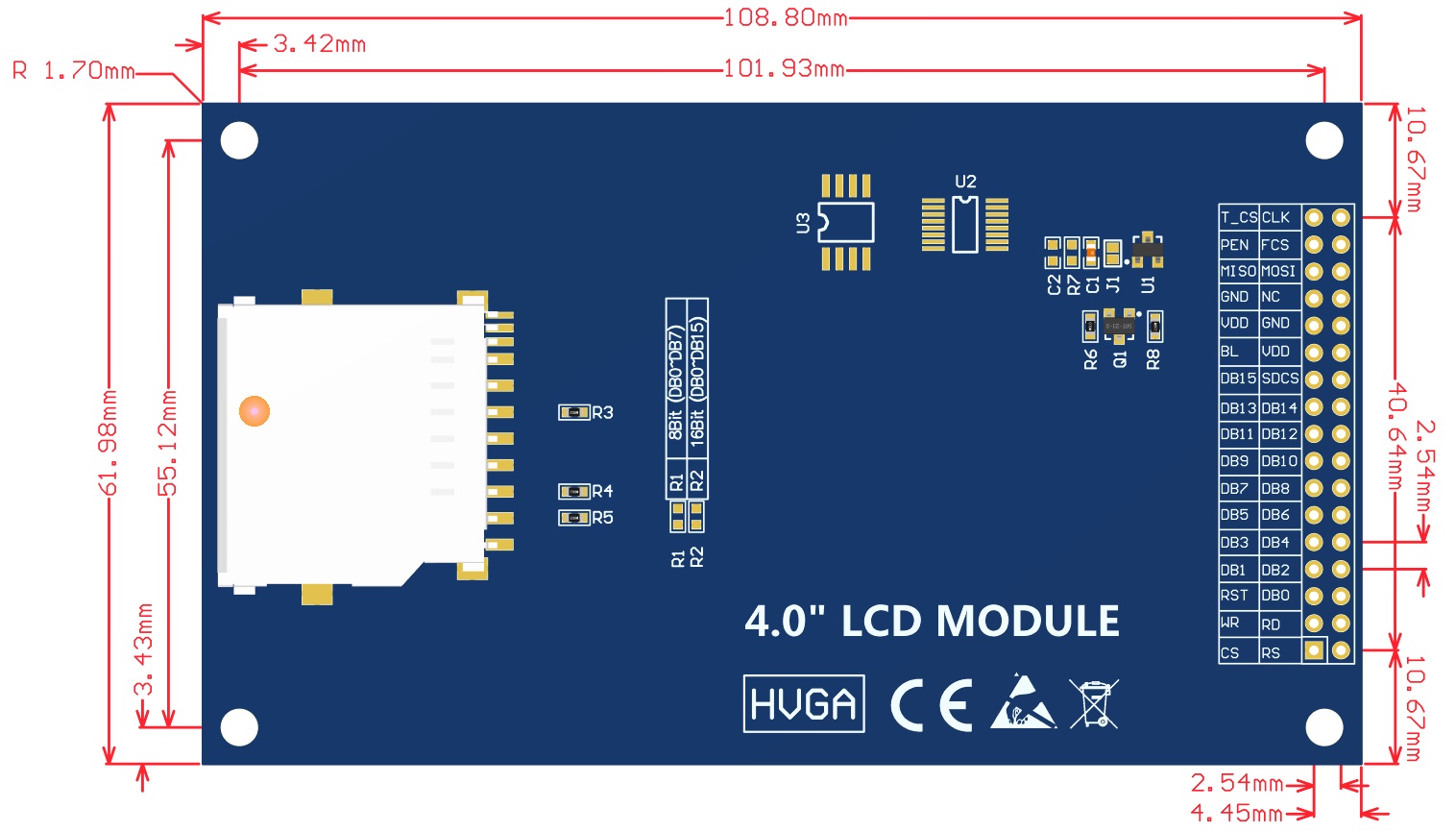
- 4.0inch 16bit Parallel-Port Module Size Picture(pdf Version)
- 4.0inch 16bit Parallel-Port Module Size Picture(jpg Version)
- 4.0inch 16bit Parallel-Port Module Schematic
- 4.0inch 16bit Parallel-Port Module LCD Schematic and PCB Package Library
- Driver IC ILI9486 Data sheet
Reference Materials
- C51 Keil and stc-isp software use illustration
- STM32 keil software use illustration
- PCtoLCD2002 software use illustration
- Image2Lcd software use illustration
- Chinese and English display modulo settings