
More actions
| Line 26: | Line 26: | ||
== Bottom support function == | == Bottom support function == | ||
*'''LCD_SetWindows''' | *'''LCD_SetWindows''' | ||
:The function implementation differs depending on the driver IC (different drive ICs set coordinate values with different commands and principles), | |||
The function implementation differs depending on the driver IC (different drive ICs set coordinate values with different commands and principles), | :but the principle is basically the same, setting the start and end coordinates and setting a display area. | ||
:Examples are as follows (ILI9341 as an example) | |||
but the principle is basically the same, setting the start and end coordinates and setting a display area. | |||
Examples are as follows (ILI9341 as an example) | |||
{{code|1= | {{code|1= | ||
void LCD_SetWindows(u16 xStar, u16 yStar,u16 xEnd,u16 yEnd) | void LCD_SetWindows(u16 xStar, u16 yStar,u16 xEnd,u16 yEnd) | ||
| Line 53: | Line 50: | ||
*'''Lcd_WriteData_16Bit''' | *'''Lcd_WriteData_16Bit''' | ||
:This function is to set the pixel color value into GRAM, and then display it | |||
This function is to set the pixel color value into GRAM, and then display it | :Examples are as follows (ILI9341 as an example) | ||
Examples are as follows (ILI9341 as an example) | |||
{{code|1= | {{code|1= | ||
void Lcd_WriteData_16Bit(u16 Data) | void Lcd_WriteData_16Bit(u16 Data) | ||
| Line 69: | Line 64: | ||
*'''LCD_DrawPoint''' | *'''LCD_DrawPoint''' | ||
:In fact, the LCD_SetWindows function and the Lcd_WriteData_16Bit function are used to display a pixel. | |||
In fact, the LCD_SetWindows function and the Lcd_WriteData_16Bit function are used to display a pixel. | :Examples are as follows (ILI9341 as an example) | ||
Examples are as follows (ILI9341 as an example) | |||
{{code|1= | {{code|1= | ||
void LCD_DrawPoint(u16 x,u16 y) | void LCD_DrawPoint(u16 x,u16 y) | ||
Revision as of 17:48, 14 January 2019
Molding software configuration
The font modulo software used in the test example is PCtoLCD2002. For detailed instructions on its use, see the following document:
PCtoLCD2002 Instructions for use
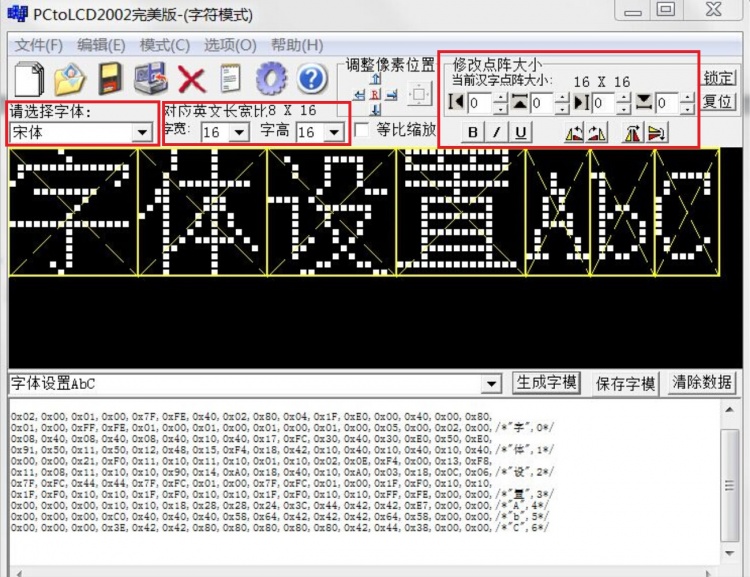
The PCtoLCD2002 software is specifically set as follows:
- Font and size selection
- Mode needs to select字符模式
- Fonts can be selected according to needs, such as selection宋体
- The word width and word height can be selected according to the needs. The font sizes commonly used in Chinese and English are as follows:
- Chinese (word width x word height):16x16、24x24、32x32
- English (character x word height):6x8、6x12、8x16、12x24、16x32(The corresponding font size needs to be set to respectively12x8、12x12、16x16、24x24、32x32)
- Modify the dot matrix size can be set according to requirements, generally set to0

- Font option setting
- There are many situations in the font option setting. Different settings and different code processing methods.
- Here is an example of the following settings, the subsequent function code is written based on this setting.
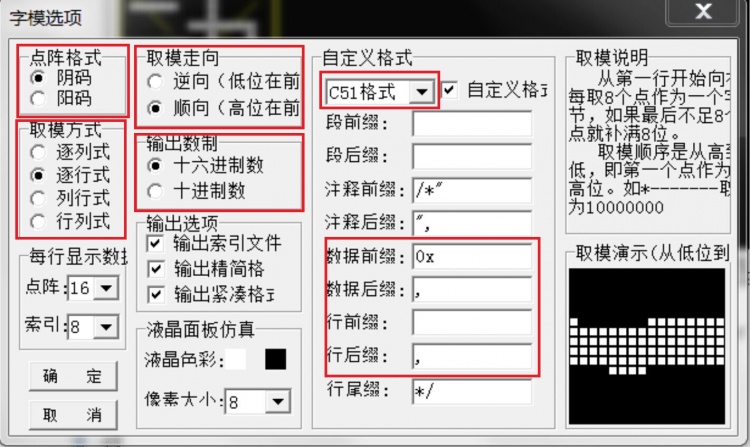
- Dot matrix format select 阴码
- Modal mode select 逐行式
- Molding trend select 顺向(高位在前)
- Output number system select 十六进制数
- Custom format select C51格式

Bottom support function
- LCD_SetWindows
- The function implementation differs depending on the driver IC (different drive ICs set coordinate values with different commands and principles),
- but the principle is basically the same, setting the start and end coordinates and setting a display area.
- Examples are as follows (ILI9341 as an example)
void LCD_SetWindows(u16 xStar, u16 yStar,u16 xEnd,u16 yEnd)
{
	LCD_WR_REG(lcddev.setxcmd);
	LCD_WR_DATA(xStar>>8);
	LCD_WR_DATA(0x00FF&xStar);
	LCD_WR_DATA(xEnd>>8);
	LCD_WR_DATA(0x00FF&xEnd);

	LCD_WR_REG(lcddev.setycmd);
	LCD_WR_DATA(yStar>>8);
	LCD_WR_DATA(0x00FF&yStar);
	LCD_WR_DATA(yEnd>>8);
	LCD_WR_DATA(0x00FF&yEnd);

	LCD_WriteRAM_Prepare();	//Start writing to GRAM
}
- Lcd_WriteData_16Bit
- This function is to set the pixel color value into GRAM, and then display it
- Examples are as follows (ILI9341 as an example)
void Lcd_WriteData_16Bit(u16 Data)
{
      LCD_CS_CLR;
      LCD_RS_SET;
      SPI_WriteByte(SPI2,Data>>8);
      SPI_WriteByte(SPI2,Data);
      LCD_CS_SET;
}
- LCD_DrawPoint
- In fact, the LCD_SetWindows function and the Lcd_WriteData_16Bit function are used to display a pixel.
- Examples are as follows (ILI9341 as an example)
void LCD_DrawPoint(u16 x,u16 y)
{
	LCD_SetCursor(x,y);//Set the cursor position
	Lcd_WriteData_16Bit(POINT_COLOR);
}
English modulo
The function is defined as follows:
void LCD_ShowChar(u16 x,u16 y,u16 fc, u16 bc, u8 num,u8 size,u8 mode)
{
   u8 temp;
   u8 pos,t;
   u16 colortemp=POINT_COLOR;
   num=num-' ';//Get the offset value
   LCD_SetWindows(x,y,x+size/2-1,y+size-1);//Set a single text display window
   if(!mode) //Non-superimposed way
   {
       for(pos=0;pos<size;pos++)
       {
	   if(size==12)
           {
              temp=asc2_1206[num][pos];//Call 1206 font
	   }
           else
           {
              temp=asc2_1608[num][pos];		 //Call 1608 font
           }
	   for(t=0;t<size/2;t++)
           {
              if(temp&(0x80>>t))
              {
                 Lcd_WriteData_16Bit(fc);
              }
	      else
              {
                 Lcd_WriteData_16Bit(bc);
	      }
           }
       }
   }
   else//Superposition method
   {
       for(pos=0;pos<size;pos++)
       {
	   if(size==12)
           {
              temp=asc2_1206[num][pos];//Call 1206 font
	   }
           else
           {
              temp=asc2_1608[num][pos];		 //Call 1608 font
	   }
	   for(t=0;t<size/2;t++)
           {
	      POINT_COLOR=fc;
	      if(temp&(0x80>>t))
              {
                 LCD_DrawPoint(x+t,y+pos);//Draw a point
	      }
           }
       }
   }
   POINT_COLOR=colortemp;
   LCD_SetWindows(0,0,lcddev.width-1,lcddev.height-1);//Restore window to full screen
}
This function contains two English font settings of 12x6 and 16x8.
Two display modes are included: overlay mode and non-overlay mode.
Overlay mode: the font does not have a background color, and is directly superimposed and displayed on the original display content.
Non-overlay mode: The font has a background color, which will overwrite the original display.
Chinese modulo
A. 16x16 Chinese font display function is defined as follows:
void GUI_DrawFont16(u16 x, u16 y, u16 fc, u16 bc, u8 *s,u8 mode)
{
   u8 i,j;
   u16 k;
   u16 HZnum;
   u16 x0=x;
   HZnum=sizeof(tfont16)/sizeof(typFNT_GB16);	//Automatic statistics of the number of Chinese characters
   for (k=0;k<HZnum;k++)
   {
       if((tfont16[k].Index[0]==*(s))&&(tfont16[k].Index[1]==*(s+1)))
       {
           LCD_SetWindows(x,y,x+16-1,y+16-1);
	   for(i=0;i<16*2;i++)
           {
		for(j=0;j<8;j++)
		{
		     if(!mode) //Non-superimposed way
		     {
			  if(tfont16[k].Msk[i]&(0x80>>j))
                          {
                               Lcd_WriteData_16Bit(fc);
                          }
                          else
                          {
                               Lcd_WriteData_16Bit(bc);
			  }
		     }
		     else //Superposition method
		     {
			  POINT_COLOR=fc;
			  if(tfont16[k].Msk[i]&(0x80>>j))
                          {
                               LCD_DrawPoint(x,y);//Draw a point
			  }
			  x++;
			  if((x-x0)==16)
			  {
			       x=x0;
			       y++;
			       break;
			  }
		     }
	        }
	    }
	 }
	 continue;  //Find the corresponding dot matrix font to exit immediately, to prevent the impact of multiple Chinese characters repeated modulo
    }
    LCD_SetWindows(0,0,lcddev.width-1,lcddev.height-1);//Restore window to full screen
}
B. 24x24 Chinese font display function is defined as follows:
void GUI_DrawFont24(u16 x, u16 y, u16 fc, u16 bc, u8 *s,u8 mode)
{
    u8 i,j;
    u16 k;
    u16 HZnum;
    u16 x0=x;
    HZnum=sizeof(tfont24)/sizeof(typFNT_GB24);	//Automatic statistics of the number of Chinese characters
    for (k=0;k<HZnum;k++)
    {
        if((tfont24[k].Index[0]==*(s))&&(tfont24[k].Index[1]==*(s+1)))
        {
             LCD_SetWindows(x,y,x+24-1,y+24-1);
	     for(i=0;i<24*3;i++)
	     {
		  for(j=0;j<8;j++)
		  {
			if(!mode) //Non-superimposed way
			{
                              if(tfont24[k].Msk[i]&(0x80>>j))
                              {
                                   Lcd_WriteData_16Bit(fc);
			      }
                              else
                              {
                                   Lcd_WriteData_16Bit(bc);
			      }
                        }
		        else //Superposition method
		        {
			      POINT_COLOR=fc;
			      if(tfont24[k].Msk[i]&(0x80>>j))
                              {
                                   LCD_DrawPoint(x,y);// Draw a point
			      }
                              x++;
			      if((x-x0)==24)
			      {
				   x=x0;
				   y++;
				   break;
			      }
		         }
		   }
	      }
	 }
	 continue;  //Find the corresponding dot matrix font to exit immediately, to prevent the impact of multiple Chinese characters repeated modulo
    }
    LCD_SetWindows(0,0,lcddev.width-1,lcddev.height-1);// Restore window to full screen
}
C. 32x32Chinese font display function is defined as follows:
void GUI_DrawFont32(u16 x, u16 y, u16 fc, u16 bc, u8 *s,u8 mode)
{
    u8 i,j;
    u16 k;
    u16 HZnum;
    u16 x0=x;
    HZnum=sizeof(tfont32)/sizeof(typFNT_GB32);	//Automatic statistics of the number of Chinese characters
    for (k=0;k<HZnum;k++)
    {
	 if ((tfont32[k].Index[0]==*(s))&&(tfont32[k].Index[1]==*(s+1)))
	 {
               LCD_SetWindows(x,y,x+32-1,y+32-1);
	       for(i=0;i<32*4;i++)
	       {
		     for(j=0;j<8;j++)
	             {
			   if(!mode) //Non-superimposed way
			   {
				if(tfont32[k].Msk[i]&(0x80>>j))
                                {
				      Lcd_WriteData_16Bit(fc);
                                }
				else
                                {
                                      Lcd_WriteData_16Bit(bc);
				}
                           }
			   else //Superposition method
			   {
				POINT_COLOR=fc;
			        if(tfont32[k].Msk[i]&(0x80>>j))
                                {
                                      LCD_DrawPoint(x,y);// Draw a point
				}
		                x++;
				if((x-x0)==32)
				{
				      x=x0;
				      y++;
				      break;
				}
			   }
		      }
		}
	  }
	  continue;  //Find the corresponding dot matrix font to exit immediately, to prevent the impact of multiple Chinese characters repeated modulo
     }
     LCD_SetWindows(0,0,lcddev.width-1,lcddev.height-1);// Restore window to full screen
}
The above three functions are display settings for 16x16, 24x24, 32x32 Chinese characters.
Two display modes are included: overlay mode and non-overlay mode.
Overlay mode: the font does not have a background color, and is directly superimposed and displayed on the original display content.
Non-overlay mode: The font has a background color, which will overwrite the original display.